Here is something most people find out the hard way.
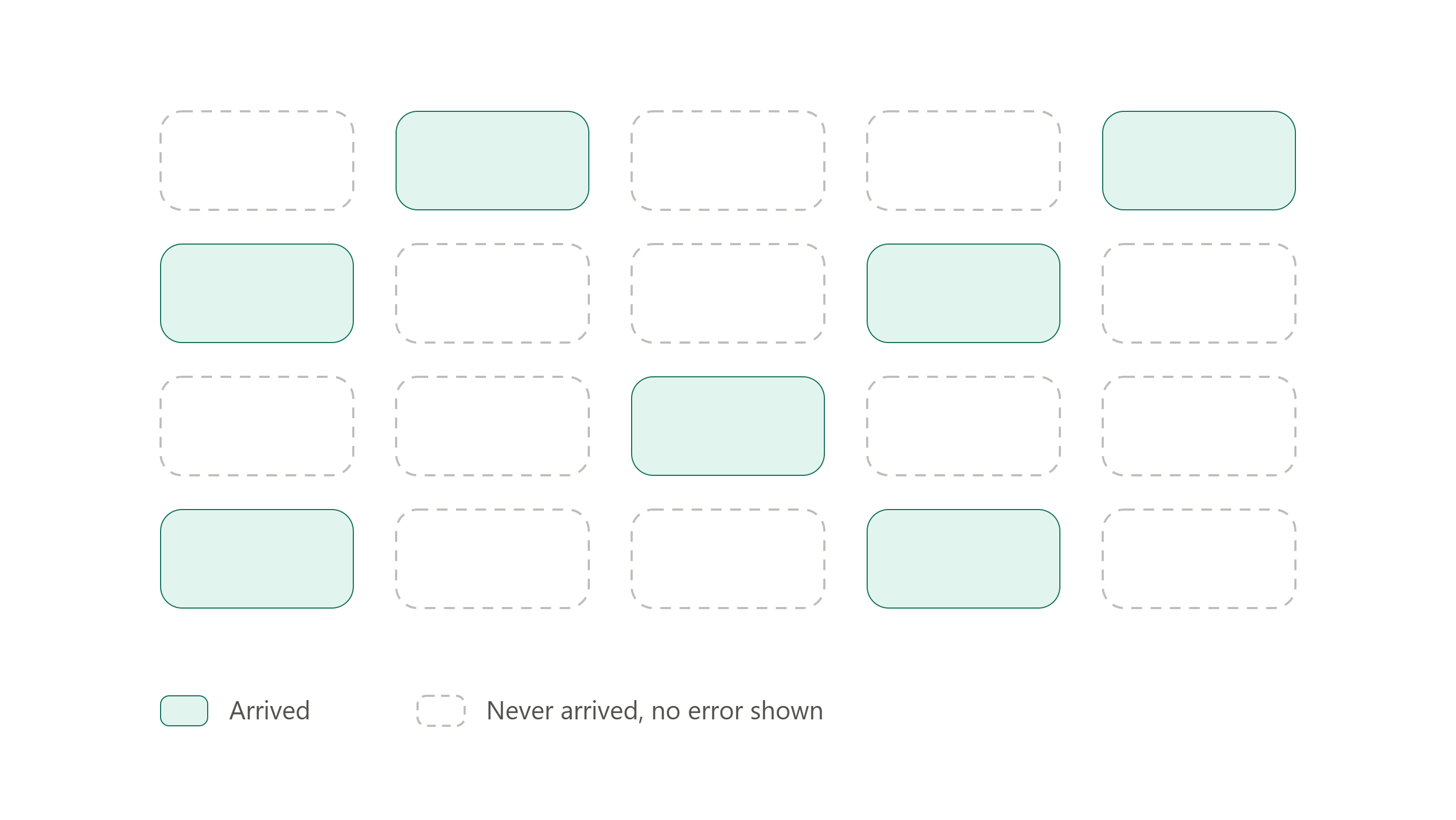
If you use WhatsApp's built-in broadcast list feature to message 200 customers, and 140 of them have not saved your number in their phone, those 140 messages never arrive. No error. No bounce notice. One grey tick and silence.
This catches people out because a normal one-to-one chat behaves completely differently. Message someone individually and it delivers whether or not they have saved you. So people test with a single message, see it arrive, build a broadcast list of 200, and half the audience silently disappears.
That one distinction explains most of the disappointment people feel about WhatsApp marketing. They think the message did not work. The message was never delivered.
This guide covers the whole picture — permission, tools, costs, what to send, how often, and how not to get your number banned. It is written for someone with a few hundred to a few thousand customer numbers and no marketing department.
I build WhatsApp messaging software, so I have a bias and you should know it upfront. I will point out where my product is the wrong choice as clearly as where it is the right one.
What WhatsApp marketing actually is
WhatsApp marketing means sending messages to people who already gave you their number and agreed to hear from you. Customers. Enquiries. People who bought something. People who filled in a form.
That is the whole definition. Everything else — buying a list of numbers, scraping a directory, messaging people who found you in a group — is not marketing. It is the fastest route to a banned number and an annoyed audience.
The reason WhatsApp is worth the effort is simple. People read WhatsApp messages. An email sits unopened for three days. A WhatsApp message gets looked at within minutes, because it lands in the same place as messages from family.
That is also the danger. Nobody minds a promotional email they can ignore. People mind a promotional WhatsApp. The bar for what you send is much higher than email, and if you send the wrong thing, they will not unsubscribe quietly. They will block you and report you.
The three ways to send
There are only three real options. Choosing wrong is the most common expensive mistake.
The free WhatsApp Business app. Free, on your phone, five minutes to set up. Labels for organising contacts, a product catalogue, away messages, quick replies. Broadcast lists capped at 256 contacts each, and the saved-number rule applies.
The WhatsApp Business Platform (the API). WhatsApp's official route for businesses at scale. No contact cap, no saved-number requirement, a verified green tick, delivery reports, several staff on one number, buttons in messages. You pay per message and you go through a provider. Every message you start must use a template Meta approved in advance.
Desktop sender software. Windows apps that automate the regular WhatsApp interface from your computer. One-time price, no per-message cost, no template approval. This is what my product BuzzRelay is. The honest trade-off is at the end of this guide.
A short version of how to choose: under 256 contacts and sending occasionally, use the free app. Thousands of contacts, transactional messages, or anything where losing the number would be a disaster, use the API. In between, and cost-sensitive, is where desktop tools sit.
Permission is the part that decides everything
Everything else in this guide is technique. This part is the foundation, and most people skip it.
Permission means the person knowingly agreed to receive messages from your business. Not "they gave me their number when they ordered." Not "they are in my phone." They said yes to hearing from you.
Ways to collect it that actually work:
- A line on your order form: "Send me offers and updates on WhatsApp." With a checkbox they tick themselves.
- A QR code in your shop that opens a chat with you. If they message you first, that is permission and it is recorded in the chat.
- Asking at the counter, and saving the number with a note.
- A Click-to-WhatsApp ad. They tap, they message you, permission is captured.
Keep a record of when and how each person opted in. A spreadsheet column with a date is enough. If a number ever gets reported, that record is the difference between a mistake and a pattern.
The other half of permission is the save. Because of the saved-number rule, a contact who has not saved you may as well not exist. Fix this deliberately: after someone opts in, send one message asking them to save your number, and tell them why — "Save this number so you get your order updates." Put your number on the receipt, the packaging, the invoice, and the shop wall.
This one habit does more for your delivery rate than any software.
Building your list without buying one
You will be tempted to buy a list. Do not. Purchased numbers have not heard of you, will block you within a day, and will take your number down with them.
Slower ways that work:
- Every existing customer in your phone or billing system, asked properly for permission
- A QR code at the point of sale
- Your website, with a WhatsApp button instead of a contact form
- Instagram and Facebook bio links pointing to a WhatsApp chat
- Offering something small for signing up — a first-order discount, a free guide, early access
Clean the list before you use it. Remove duplicates, remove numbers that are missing digits or missing country codes, remove people who asked to stop. A list of 800 real contacts outperforms 3,000 unchecked ones, and it costs you less to message.
What to actually send
The rule that matters: if the message would be unwelcome from a friend, it is unwelcome from a business.
Things that work well on WhatsApp:
- Order confirmations and delivery updates
- Appointment reminders
- A genuine offer with a real deadline, not a permanent "sale"
- Restock notices for something they asked about
- Festival greetings that do not sell anything
- Answers to a question they asked
Things that do not:
- The same offer sent every week
- Long paragraphs of company news
- Anything forwarded that looks like it was forwarded
- Good morning images
- Messages with no reason for arriving today
Write like a person. Use their name. Keep it under about five lines. Say the one thing you have to say and stop.
The broadcast limit you will hit
Broadcast lists on both the free WhatsApp app and the WhatsApp Business app cap at 256 contacts each. That number has not moved in a decade. You can make several lists, but each send is separate and manual, there is no scheduling, and no delivery reporting beyond individual ticks.
Add the saved-number rule on top and a broadcast list becomes a small tool. It works well for a coach with 150 students whose number everyone has saved. It stops working the moment you have 1,200 customers, most of whom have never added you.
Worth testing yourself rather than taking my word for it: send one broadcast to two of your own numbers, one that has you saved and one that does not. The difference is immediate and it will change how you think about your list.
Note the distinction again, because it matters when you compare tools. This rule belongs to the broadcast list feature specifically. Messages sent as individual chats — which is how the API and desktop sender software both work — deliver regardless of whether the person saved you.
What it costs
The free app costs nothing. That is its main advantage and it is a real one.
The API charges per delivered message, and the rate depends on which country your customer's number is in and what category your message falls into. Marketing messages are the expensive category — often five to ten times what a transactional message costs. A campaign that costs about $50 to Indian numbers can cost several hundred dollars to European ones.
Two things change the maths a lot. Replies inside the 24-hour window after a customer messages you are currently free. And Meta has announced changes taking effect on 1 October 2026 that make some previously free messages chargeable — if you are budgeting for Q4, check the current rates rather than an older article.
Desktop tools charge once and have no per-message cost, which is why they exist.
How often to send
Most small businesses either send nothing for four months or send three times a week for two weeks and then stop.
A workable rhythm for a general small business is two to four promotional messages a month. Transactional messages — order updates, reminders, replies — do not count towards that and can be as frequent as the situation needs.
Space them out. Send during working hours in your customer's timezone, not at 11pm because that is when you had time. Never send twice in one day.
If block rates or complaints go up, you are sending too much. That signal appears before the ban does.
Following up without becoming annoying
Most sales are lost in the gap between interest and purchase, and most businesses do nothing in that gap.
The short version: follow up two or three times, spaced days apart, and make each message add something new. A follow-up that only says "just checking in" teaches people to ignore you. A follow-up that answers the objection they probably have does not.
When someone stops replying, stop. One final message that closes the loop politely is fine. A fourth chase is not.
Staying out of trouble
WhatsApp's systems do not read your messages to decide if you are a spammer. They watch behaviour: how fast you send, how many people block you, how many report you, how many recipients have never saved your number.
The habits that keep you safe are boring and they work:
- Message only people who opted in
- Warm up a new number gradually instead of sending 1,000 messages on day one
- Leave gaps between messages rather than firing them in a burst
- Do not send at night
- Vary your message text instead of sending an identical block to everyone
- Give people an easy way to stop, and honour it immediately
Block rate is the number that matters most. If people are blocking you, no setting will save the number.
Measuring whether it worked
Read receipts are not a success metric. On WhatsApp almost everything gets read.
Track four things:
- Delivered vs sent. A big gap means the saved-number problem.
- Replies. The real engagement signal. A campaign with 40 replies beat a campaign with 400 reads and none.
- Blocks and opt-outs. Rising numbers mean you are sending too much or the wrong thing.
- Actual sales attributed to the send. Use a discount code or a unique link so you can tell.
Write those four numbers down after each campaign. After three campaigns you will know more about your customers than any guide can tell you.
Where BuzzRelay fits, and where it does not
I build BuzzRelay, a Windows app that sends personalised WhatsApp campaigns from your own PC. One-time $27, no monthly fee, no per-message charge, with a 3-day free trial. It handles Excel contact import, scheduling, randomised delays, daily send limits, and number warm-up.
Because it sends each message as an individual chat rather than through a broadcast list, the saved-number rule does not apply — your contacts receive the message whether or not they added you.
It is a reasonable fit if you have a few hundred to a few thousand opted-in contacts, you send occasionally rather than continuously, per-message costs would be more than the whole tool costs, and you do not need a verified green tick.
You should use something else if:
- You have fewer than 256 contacts and send rarely. The free WhatsApp Business app is enough, and free beats $27.
- You need a green tick, buttons in messages, several agents on one number, CRM integration, or guaranteed delivery without a computer being switched on. That is the API, and no desktop tool substitutes for it.
- You cannot afford to lose the number. This is the important one. Desktop senders automate the regular WhatsApp interface, which is not WhatsApp's sanctioned route for business messaging. The account risk sits with you, not with a provider. If that number is your only line to your customers, use the API and pay the per-message cost.
I would rather you make that choice with the trade-off in front of you than find out later.
Your first 30 days
If you are starting from nothing, do this in order:
- Week 1 — Install the free WhatsApp Business app. Fill in your business profile properly. Add your catalogue if you sell products.
- Week 1 — Put your WhatsApp number on your receipts, packaging, website and shop wall, and ask customers to save it.
- Week 2 — Add a permission checkbox to your order form. Start recording who opted in and when.
- Week 2 — Export your existing customer numbers into a spreadsheet. Clean it. Remove duplicates and broken numbers.
- Week 3 — Send one message to your first 100 contacts. Something useful, not an offer. Note how many delivered.
- Week 4 — Send your first real offer with a deadline and a discount code. Record delivered, replies, blocks, sales.
Then repeat, and look at the numbers. That is the entire method. Tools only matter once step 2 and step 3 are working.
The businesses that do well on WhatsApp are not the ones with the best software. They are the ones whose customers saved their number and are glad when it appears.