
How anti-ban protection works
BuzzRelay's protections all address one thing: making automated sending look like ordinary human use. Randomised delays break up machine-gun timing, typing simulation avoids instant input, spin text stops messages being byte-identical, daily limits cap volume per device, the number warmer ramps new numbers, and quiet hours keep sending out of the night. None of them address recipient reports, which is the strongest ban signal — only your list quality does that.
The model
WhatsApp's spam detection weighs several signals. BuzzRelay's settings map onto some of them and not others, and it is worth being clear which:
| Risk signal | Addressed by | How much it helps |
|---|---|---|
| Recipients block and report you | Nothing in the software | — this is your list |
| Uniform, rapid send timing | Randomised delay range | A lot |
| New account, high volume | Number Warmer | A lot |
| High daily volume | Per-device daily limit | Meaningful |
| Byte-identical content | Spin text and variables | Meaningful |
| Instant, machine-like input | Typing simulation | Moderate |
| Sending at unsociable hours | Quiet Hours | Moderate, and it lowers reports too |
| Cross-account fingerprinting | Isolated browser sessions | Moderate |
Look at the first row. The strongest driver of bans is the one no setting touches. Every control below is a second-order protection layered on top of a consented list — not a substitute for one. See How to avoid a WhatsApp ban.
The controls
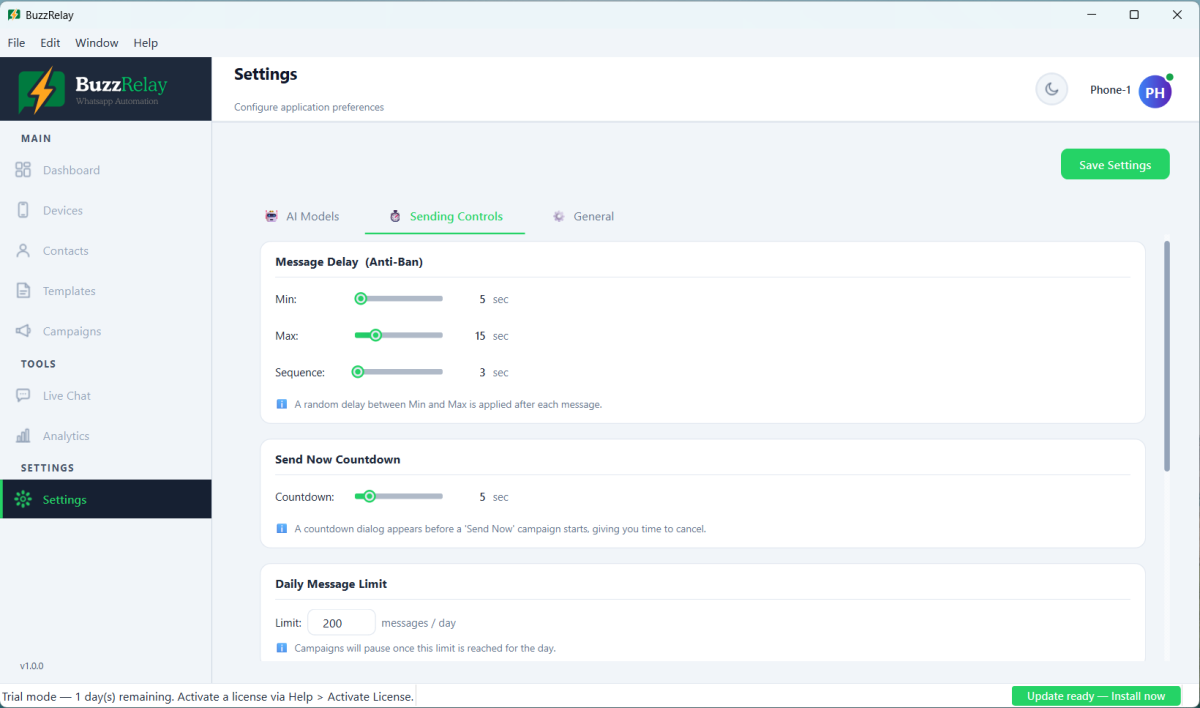
All of these live in Settings → Sending Controls, and the delay and limit values can also be overridden per campaign.
Randomised delay between messages
Default 5 to 15 seconds. A fresh random value is chosen for every recipient, so the pattern never repeats. A wide range is better than a narrow one — the variation is the point, not the average. Widen it to 30–90 seconds for new numbers or colder lists.
Sequence delay
Default 3 seconds, applied between messages sent to the same recipient. It is what makes a three-message sequence read like someone typing three messages rather than one paste.
Typing simulation
On by default. Types with variable rhythm and pauses instead of inserting text instantly, and there is a speed setting to slow it down or speed it up.
Daily message limit
Default 200 per device. Once it is reached the app pauses the campaign for that day rather than pushing on. Raising it does not raise what WhatsApp tolerates; it only removes your own safety net. To send more, add devices: Run multiple devices and spread volume.
Number Warmer
On by default. Ramps a newly connected device instead of letting it start at full volume — 30 messages on day one rising by 10 a day across a 7-day schedule, all adjustable. See How to warm up a new WhatsApp number.
Quiet Hours
Off by default — turn it on. Blocks sending outside a window you set. It matters most for the case you are not watching: a long campaign drifting into the night. A message that wakes someone is reported far more often than the same message at 11am.
Spin text and variables
Not in Sending Controls, but they belong in this list: they stop every recipient receiving byte-identical text. See Use spin text and Personalise messages with variables.
Isolated browser sessions
Not a setting — it is how devices work. Each connected number gets its own browser profile, so accounts never share cookies or storage.
Recommended configurations
| Situation | Delay | Daily limit | Warmer |
|---|---|---|---|
| New number, first fortnight | 30–90s | Leave to the warmer | On, 14 days |
| Established number, opted-in list | 5–15s | 200 | Off once warmed |
| Established number, colder list | 15–45s | 100–150 | Off |
| After a restriction | 60–120s | 50 | On again |
Quiet Hours on in every row.
What none of it can do
These settings make sending look like a person using WhatsApp normally. They cannot make an unwanted message wanted. If your list is not opt-in, the recipients still report you, and reports still cost you the number — just slightly later.
Frequently asked questions
What anti-ban features does BuzzRelay have?
Randomised delays between messages, a sequence delay within a message set, typing simulation, a per-device daily limit, a number warmer for new devices, quiet hours, spin text and variables for content variation, and an isolated browser session per device.
Which anti-ban setting matters most?
The randomised delay range and the number warmer address the strongest signals the software can influence. But the strongest ban driver overall is recipients blocking and reporting you, and no setting affects that — only sending to people who consented does.
Should I turn on Quiet Hours?
Yes. It is off by default and worth enabling. Its main value is preventing a long campaign from drifting into the night, and messages that arrive while people are asleep are reported at a much higher rate.
Is it safe to increase the daily message limit?
The setting only controls when BuzzRelay stops sending; it has no effect on what WhatsApp tolerates. If you need more volume, connect additional devices and run one campaign per device rather than raising the per-device limit.
Last updated: