
Device shows disconnected or the QR code won't scan
WhatsApp QR codes refresh roughly every 20 to 25 seconds, so the usual fix is to click Refresh and scan the new one quickly. If the QR never appears at all and the browser window stays blank, the Chromium download did not complete — check that %LOCALAPPDATA%\BuzzRelay\browsers\ contains a chromium folder. A device that keeps disconnecting is almost always a phone that has been offline too long.
The QR code expires before I can scan it
WhatsApp QR codes are short-lived — the screen refreshes them roughly every 20 to 25 seconds. That is WhatsApp's rule, not a BuzzRelay setting.
Click Refresh beside the QR code to generate a new one, and have your phone ready first:
- On your phone, open WhatsApp → Linked Devices → Link a Device before you refresh.
- Get the camera to the screen.
- Then click Refresh and scan straight away.
If the code is hard to scan, raise your screen brightness and make sure the whole code is visible without a scrollbar cutting an edge off.
The QR code never appears / the window stays blank
This means the browser could not start, which almost always means Chromium did not download properly on first launch.
- Open File Explorer at
%LOCALAPPDATA%\BuzzRelay\browsers\. - Check for a
chromium-*subfolder. - If it is missing or empty, confirm you have internet access and restart BuzzRelay to trigger the download again.
Behind a firewall or proxy, allow outbound access to playwright.azureedge.net. More detail in BuzzRelay does not start or the splash screen freezes.
The device keeps going disconnected
Sessions persist for weeks, but only while the paired phone checks in. Causes, in order of likelihood:
| Cause | Fix |
|---|---|
| Phone offline for a long stretch | Bring the phone online and reconnect. |
| Device unlinked on the phone | Check WhatsApp → Linked Devices on the phone. |
| WhatsApp expired the link | Normal. Reconnect and scan again. |
| Same number linked in too many places | WhatsApp limits linked devices; remove ones you do not use. |
| Number restricted by WhatsApp | See My WhatsApp number was restricted or banned. |
| Browser profile damaged | Reconnect; if it persists, remove and re-add the device. |
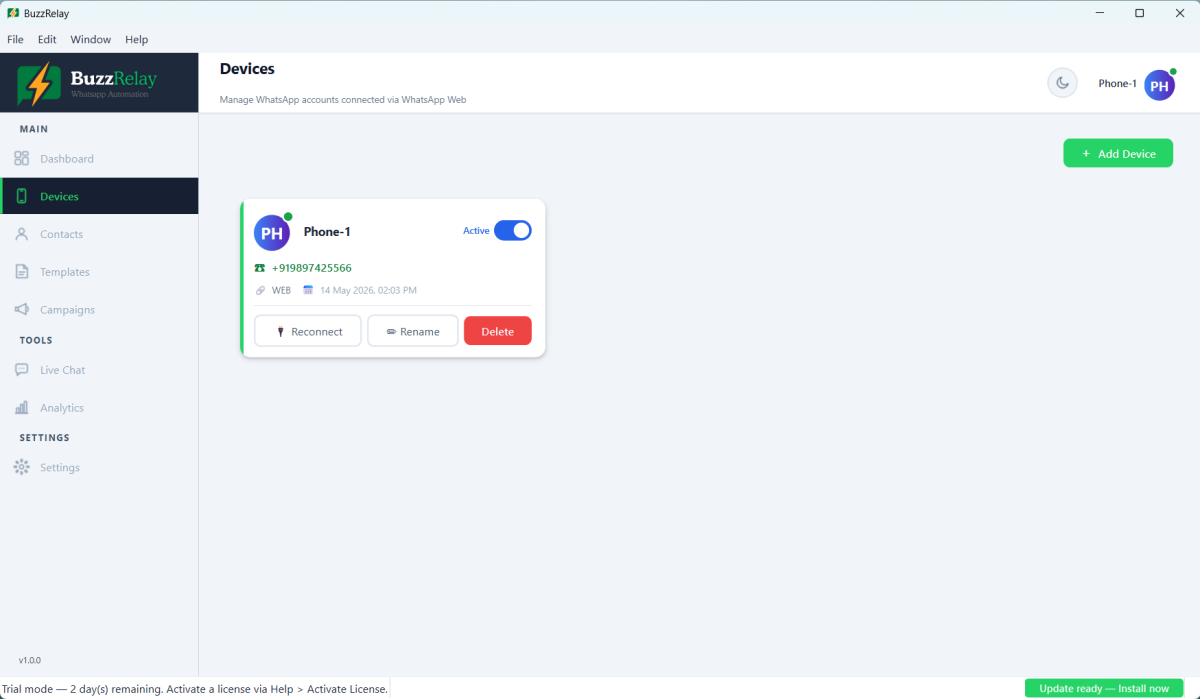
Reconnecting
Click Reconnect on the device card and scan the new QR code. This replaces only the browser session — your contacts, templates and campaign history are untouched.
If a device disconnects mid-campaign the campaign stops. Recipients not yet reached stay pending, so reconnect and resume rather than creating a new campaign, or the people already messaged will get it twice. See Campaign and recipient statuses.
Device shows "error"
An error status means the session could not be opened at all — usually the browser failing to launch. Check the browsers folder as above, close any stray BuzzRelay.exe in Task Manager, and check antivirus is not blocking Chromium.
Last resort: remove and re-add
If one device is persistently broken while others are fine, its browser profile may be damaged. Delete the device in BuzzRelay and add it again as a new one. You will scan a fresh QR code, and a clean profile is created.
This does not affect contacts or campaign history. Campaigns that used the old device will need a device reassigned before they can run again.
Frequently asked questions
Why does the WhatsApp QR code expire so quickly?
WhatsApp QR codes are valid for roughly 20 seconds, which is WhatsApp's rule rather than a BuzzRelay setting. Open Linked Devices on your phone first, then click Refresh and scan immediately.
The QR code never appears and the window is blank. What now?
The browser could not start, which usually means Chromium did not finish downloading. Check that %LOCALAPPDATA%\BuzzRelay\browsers\ contains a chromium-* folder, and if not, restore internet access and restart BuzzRelay to re-trigger the download.
Why does my device keep disconnecting?
Most often the paired phone has been offline too long, since WhatsApp Web depends on it checking in. Other causes are the device being unlinked on the phone, WhatsApp expiring the link, or too many linked devices on that number.
What happens if a device disconnects during a campaign?
The campaign stops and recipients not yet reached stay pending. Reconnect the device and resume the campaign rather than creating a new one, otherwise the people already messaged will receive it twice.
Last updated: