
WhatsApp message limits explained
WhatsApp does not publish a fixed daily message limit for ordinary accounts. In practice the limit is behavioural: a number is restricted when it sends faster than a person could, messages people did not consent to, or identical text to many recipients — and especially when recipients report or block it. A seasoned number that sends steadily to opted-in contacts can typically handle a few hundred messages a day; a brand-new number cannot.
Is there an official daily limit?
For ordinary WhatsApp and WhatsApp Business accounts, no. Meta has never published a per-day message cap, and any specific figure you see quoted online — 200, 500, 1000 — is somebody's observation, not a documented rule.
This matters because it changes what you should optimise for. There is no magic number that keeps you safe. Two accounts sending the same volume can get completely different outcomes depending on how they send and who they send to.
The one place real published limits exist is the WhatsApp Business API, which has formal messaging tiers that scale with your quality rating. That is a separate product with separate pricing — see WhatsApp Business API vs WhatsApp Web automation.
What actually triggers a restriction
WhatsApp's spam detection is behavioural. These are the signals that matter, roughly in order of how strongly they weigh:
| Signal | Why it matters |
|---|---|
| Block and report rate | The strongest signal by far. Recipients who did not expect your message are the ones who report it. |
| Send rate | Messages fired seconds apart, with no variation, do not look like a human typing. |
| Account age | A number registered this week that immediately sends to hundreds of strangers is the classic spam pattern. |
| Identical content | Byte-identical text sent to many recipients is trivially detectable. |
| Reply rate | Real conversations get replies. A number that only ever sends outbound looks like a broadcast machine. |
| Unsaved contacts | Messaging people who have never saved your number, and who never messaged you first, is higher risk. |
Notice that only one of these is about volume. You can be restricted at 50 messages if all 50 recipients report you, and be fine at 400 if they were all expecting to hear from you.
Practical daily volumes
These are working guidelines based on how the risk factors above compound — not guarantees, and not figures published by WhatsApp.
| Number age | Reasonable daily volume |
|---|---|
| Brand new (under 1 week) | 20–40, mostly conversational |
| 1–4 weeks, warming up | 40–150, ramping gradually |
| Established, good history | 200–400 |
| Established, poor report history | Reduce, or retire the number |
If you need more than one number's worth of volume, the answer is more numbers, not a higher number — see Run multiple devices and spread volume.
How BuzzRelay's limits map to this
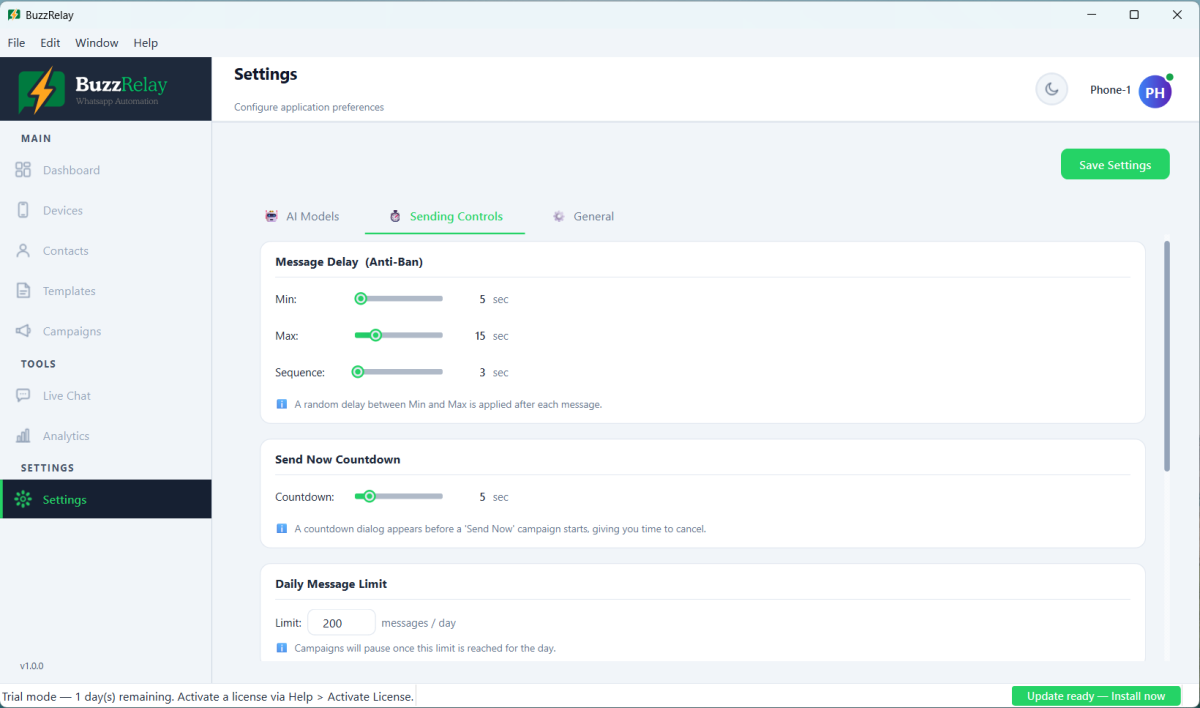
BuzzRelay ships with defaults chosen to sit inside the safe end of the table above. All of them are in Settings → Sending Controls:
| Setting | Default | What it does |
|---|---|---|
| Daily message limit | 200 per device | Per device, per day. Campaigns pause once it is reached. |
| Delay between messages | 5–15 seconds, randomised | Breaks up the machine-gun send pattern. |
| Delay within a sequence | 3 seconds | Spacing between messages sent to the same recipient. |
| Number Warmer | On — 30/day, +10/day over 7 days | Ramps a new device instead of starting at full volume. |
| Typing simulation | On | Sends the typing indicator before the message lands. |
| Quiet hours | Off by default | Blocks sending outside the window you set. |
The daily limit is per device, not per campaign. Two connected devices at the default give you 400 messages a day in total — but you divide the work yourself. A campaign sends from one device, so spreading volume means splitting the list into several campaigns and assigning each to a different device. See Run multiple devices and spread volume.
Raising the daily limit does not raise WhatsApp's tolerance. The setting only controls when BuzzRelay stops. Setting it to 2000 does not make 2000 messages safe — it just removes your own safety net.
What a restriction looks like
Restrictions are graduated rather than all-or-nothing:
- Silent throttling — messages send but delivery slows noticeably. Often the first warning sign.
- Temporary ban — a few hours to a few days, with an in-app countdown.
- Permanent ban — the number can no longer use WhatsApp, with an appeal option.
If you hit the first stage, stop sending from that number for at least 24 hours rather than pushing through it. See My WhatsApp number was restricted or banned.
Frequently asked questions
How many WhatsApp messages can I send per day?
WhatsApp publishes no official daily limit for ordinary accounts. An established number with a good history can usually send 200 to 400 messages a day to opted-in contacts; a new number should start around 20 to 40 and ramp up over about a week. Volume matters far less than whether recipients expected your message.
Does sending more messages automatically get me banned?
No. Bans are driven mainly by how many recipients block or report you, how fast you send, and how new the number is. A number can be restricted at 50 messages if recipients report it, and be fine at 400 if the contacts opted in.
Is the BuzzRelay daily limit per device or in total?
Per device. The default of 200 applies to each connected device, so two devices allow 400 messages a day in total. A campaign sends from a single device, so to use that capacity you split the recipients into separate campaigns and assign each one to a different device.
Can I raise the daily message limit safely?
You can raise it in Settings, but the setting only controls when BuzzRelay stops sending. It has no effect on what WhatsApp tolerates. If you need more volume, add more devices rather than raising the per-device limit.
Last updated: