
What is BuzzRelay?
BuzzRelay is a Windows desktop application that sends personalised WhatsApp campaigns from your own WhatsApp numbers. It drives WhatsApp Web through a real browser session on your computer — there is no cloud service and no message queue on our servers, and your contacts, templates and campaign history stay in a local database on that machine. It is a one-time purchase rather than a subscription.
What it does
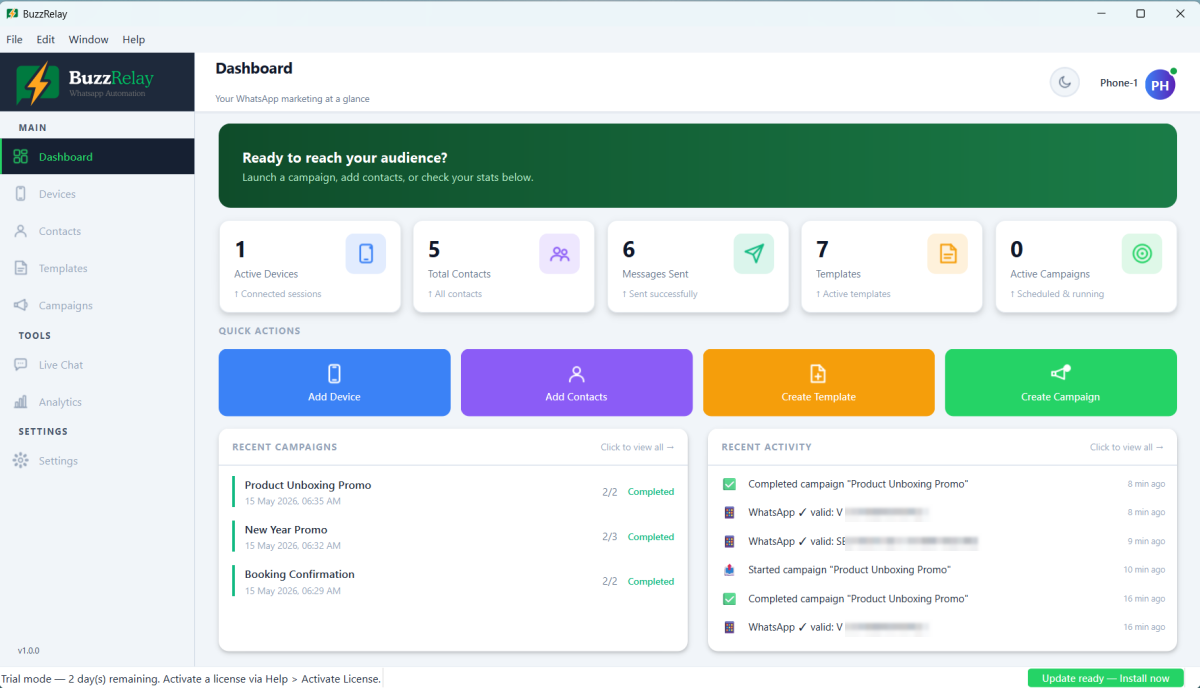
BuzzRelay connects to one or more of your own WhatsApp accounts and sends messages to your contacts, one at a time, personalised for each recipient. It handles the parts that make that practical at any scale:
- Contacts — import from Excel or CSV, organise into groups, add custom fields.
- Templates — reusable message sequences with text, images, video, audio, documents, location and contact cards.
- Personalisation — double-brace variables such as
{{name}}, plus spin text for natural wording variation. - Campaigns — send now or schedule, with per-recipient delivery status.
- Sending controls — randomised delays, per-device daily limits, quiet hours and a number warmer.
- AI drafting — generate message copy through OpenAI, Gemini, Claude or a provider you configure yourself.
- Live Chat — read and reply to conversations without leaving the app.
- Analytics — per-campaign results and exportable logs.
How it works, briefly
BuzzRelay opens a real browser session logged into your WhatsApp account — the same WhatsApp Web you would use yourself — and types and sends messages through it. Each connected number is called a device, and each device has its own isolated browser profile, so accounts never share state.
Because it is your own account doing the sending, replies arrive in your normal WhatsApp and you can carry on the conversation like any other. See How BuzzRelay sends messages.
What runs where
| Component | Where it lives |
|---|---|
| The application | Your Windows PC |
| Your contacts and custom fields | Local database on your PC |
| Templates and campaign history | Local database on your PC |
| WhatsApp sessions | Browser profiles on your PC |
| Message sending | Your PC, through your own WhatsApp account |
| Our servers | Licence checks and updates only |
We never receive your contact list or your message content. That also makes the security of that data your responsibility — see Where BuzzRelay stores your data.
What it is not
Worth knowing before you buy:
- Not the WhatsApp Business API. BuzzRelay does not connect to Meta's official API and does not resell access to it — see WhatsApp Business API vs WhatsApp Web automation.
- Not a cloud service. Your PC has to be on and online for a campaign to run.
- Not a source of contacts. It sends to lists you already have; it does not supply numbers.
- Not a guarantee against a ban. Automation breaches WhatsApp's terms, and no tool can prevent recipients from reporting you — see What BuzzRelay does not do.
- Not for macOS or Linux. Windows 10 and 11 only.
Who it suits
BuzzRelay fits a business with an existing list of customers or enquiries who agreed to hear from them — typically sending hundreds to low thousands of messages a month, where the WhatsApp Business API's per-message fees and template approval would be disproportionate.
It does not fit anyone hoping to message a purchased list. That is outside what we support, and it is the fastest route to losing a number — see Acceptable use policy.
Licensing
A one-time purchase with no subscription, activated with either an Envato purchase code or a licence key. The licence binds to the computer it is activated on. See Activate your license.
New here? Work through Getting Started in order: System requirements → Install BuzzRelay → Activate your license → Connect your first device → Send your first campaign.
Frequently asked questions
What is BuzzRelay used for?
Sending personalised WhatsApp campaigns from your own WhatsApp numbers — order updates, reminders, offers and follow-ups to contacts who gave you their number. It runs as a Windows desktop application on your own computer.
Does BuzzRelay store my contacts on your servers?
No. Contacts, templates and campaign history are stored in a local database on your own PC. Our servers are only involved in licence checks and update downloads; we never receive your contact list or message content.
Is BuzzRelay a subscription?
No, it is a one-time purchase. You activate it with an Envato purchase code or a licence key, and the licence binds to the computer it is activated on.
Does BuzzRelay work on Mac or Linux?
No. BuzzRelay is a Windows application and supports Windows 10 and Windows 11, 64-bit only.
Last updated: