
Messages are failing to send
Check three things in order: that the sending device still shows connected, that the failing numbers are actually on WhatsApp, and whether the daily send limit has been reached. Failures spread evenly through a campaign usually mean list quality; failures that start part-way and then continue usually mean the number is being throttled.
Check these three first
- Is the device still connected? Open Devices and confirm a green status. A session that dropped mid-campaign fails everything after that point — see Device shows disconnected.
- Are the numbers on WhatsApp? A valid, well-formed number with no WhatsApp account always fails — see How to check whether a number is on WhatsApp.
- Has the daily limit been reached? Check Settings → Sending Controls. Recipients beyond the limit are marked skipped rather than failed, so if you are seeing skipped rather than failed, this is why.
Read the pattern, not just the total
Export the campaign log from Analytics and look at where the failures sit in the order.
| Pattern | Likely cause | Action |
|---|---|---|
| Scattered evenly throughout | List quality — numbers not on WhatsApp | Clean the list; normal for an old one |
| Fine, then everything fails from a point onward | Device disconnected at that moment | Reconnect and resume |
| Failures increase gradually as it runs | The number is being throttled | Stop for 24h — see restricted or banned |
| Everything fails from the very first | Device not really connected, or all numbers malformed | Check the device, then the number format |
| Only media messages fail | File size or a missing file | See Media and attachment problems |
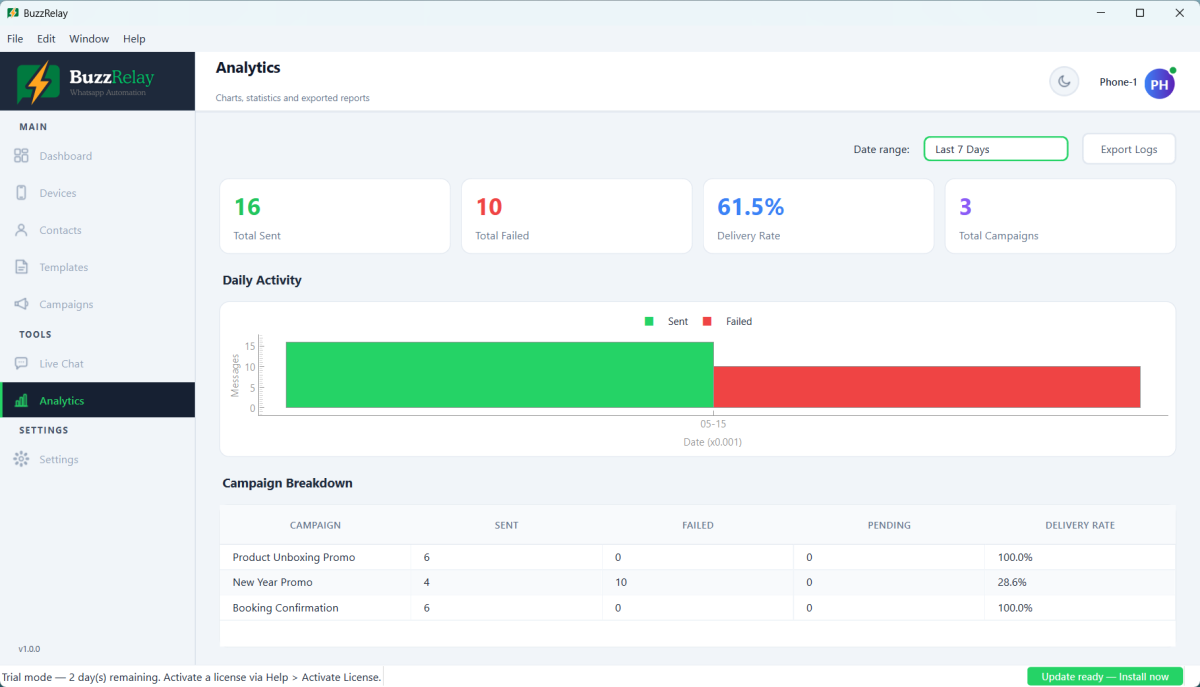
Everything fails immediately
- Device shows connected but is not really. Reconnect and scan a fresh QR code.
- Numbers missing country codes. Check the default phone region, or store numbers in full international format — see Import contacts from Excel.
- The phone went offline. WhatsApp Web depends on it.
- The number is restricted. Try sending one message by hand from the phone; if that fails too, it is the account.
Delivery is very slow rather than failing
Messages that send but take a long time to show two ticks are a warning sign of soft throttling. It is the earliest stage of a restriction and it comes with no notification.
Do not push through it. Stop that number for at least 24 hours, then resume at lower volume with wider delays. Continuing is what turns a soft throttle into a temporary ban, and a temporary ban into a permanent one.
A few failures is normal
A campaign showing 185 sent out of 200 is not necessarily a problem — 15 of those numbers may simply have no WhatsApp account, which is ordinary for a list of any age. Compare against your own baseline over time rather than expecting 100%.
What deserves attention is a sudden change: a list that normally delivers 95% dropping to 70% means something changed, and it is usually the number rather than the list.
Before re-sending failures
A recipient that failed part-way through a multi-message sequence already received the earlier messages. Re-running the whole sequence sends those again. Check the log first — see Campaign and recipient statuses.
Frequently asked questions
Why are my WhatsApp messages failing to send?
Check whether the sending device still shows connected, whether the failing numbers are actually registered on WhatsApp, and whether the daily send limit has been reached. Those three cover the large majority of failures.
What does it mean if failures start part-way through a campaign?
If everything fails from one point onward, the device disconnected at that moment — reconnect and resume. If failures increase gradually instead, the number is likely being throttled by WhatsApp, and you should stop sending from it for at least 24 hours.
Is it normal for some messages to fail?
Yes. Numbers with no WhatsApp account always fail, so a small proportion of failures is ordinary for any list. What matters is a sudden change from your usual rate, which usually indicates a problem with the number rather than the list.
My messages send but take ages to deliver. Is that a problem?
It is often the earliest sign of soft throttling, which comes with no notification. Stop sending from that number for at least 24 hours and resume at lower volume with wider delays rather than pushing through it.
Last updated: