
Complete settings reference
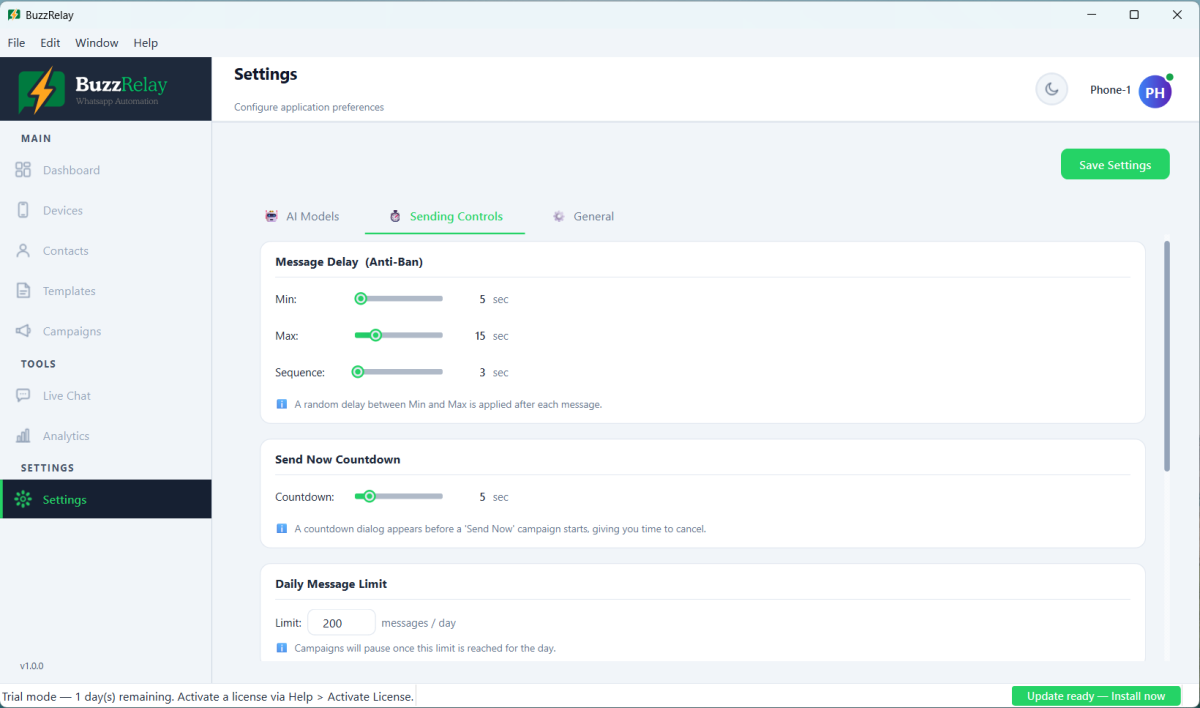
Every BuzzRelay setting with its default. The ones that matter most are the delay range (5–15 seconds), the daily message limit (200 per device), the Number Warmer (on, 7 days, starting at 30 and rising by 10), typing simulation (on), and Quiet Hours (off by default — worth turning on). Delay and limit values can also be overridden per campaign.
Sending controls
The settings that shape how a campaign paces itself. These are also the anti-ban controls — see How anti-ban protection works.
| Setting | Default | What it does |
|---|---|---|
| Minimum delay | 5 seconds | Lower bound of the random wait between recipients. |
| Maximum delay | 15 seconds | Upper bound. A fresh random value is chosen for every recipient. |
| Sequence delay | 3 seconds | Wait between messages sent to the same recipient. |
| Daily message limit | 200 | Per device, per day. The app pauses a campaign once the limit is reached for that day. |
| Typing simulation | On | Types with human-like rhythm instead of inserting text instantly. |
| Typing speed | 3 (normal) | 1 is slowest, 5 is fastest. Only applies when typing simulation is on. |
| Send countdown | 3 seconds | Grace period before a "send now" campaign begins. 0 disables it. |
Delays and the daily limit can be overridden per campaign, so a cautious campaign can use wider gaps without changing your global defaults.
Quiet Hours
| Setting | Default | What it does |
|---|---|---|
| Quiet hours enabled | Off | When on, sending is blocked outside the window below. |
| Quiet hours start | — | When the blocked period begins. |
| Quiet hours end | — | When it ends. |
Uses your computer's local time, not the recipient's. For a list spanning time zones, split it into separate campaigns per region — see Best time to send WhatsApp marketing messages.
Number Warmer
| Setting | Default | What it does |
|---|---|---|
| Warmer enabled | On | Applies a ramp to newly connected devices. |
| Warmer days | 7 | Length of the ramp before the normal daily limit applies. |
| Start count | 30 | The cap on day one. |
| Increment | 10 | How much the cap rises each day. |
Defaults give 30, 40, 50 … 90 across seven days, after which the device falls back to the daily message limit. See How to warm up a new WhatsApp number.
Contacts
| Setting | Default | What it does |
|---|---|---|
| Default phone region | IN | Country assumed for numbers with no country code. Set it to where most contacts are, or store numbers in full international format. |
AI providers
You supply your own API keys; generation is billed to your account with the provider.
| Setting | Default |
|---|---|
| Default AI provider | openai |
| OpenAI API key | Empty |
| OpenAI model | gpt-4o |
| Gemini API key | Empty |
| Gemini model | gemini-1.5-pro |
| Claude API key | Empty |
| Claude model | claude-sonnet-4-6 |
Custom providers such as LM Studio, Ollama, OpenRouter and Groq can be added separately with their own base URL and model name. Model names change as providers retire them — if generation stops working, check the model still exists. See AI content generation errors.
Application
| Setting | Default | What it does |
|---|---|---|
| Theme | Light | Light or dark interface. |
| Headless mode | On | Runs the sending browser without a visible window. Turning it off shows the browser, which is useful for diagnosis but uses more resources. |
Settings worth changing from the defaults
| Setting | Change it when |
|---|---|
| Quiet hours | Always — it ships off and it is the cheapest protection you have. |
| Default phone region | Your contacts are not mostly Indian numbers. |
| Delay range | New number, or a colder list — widen it. |
| Daily limit | Lower it after any restriction. Raising it does not make more sending safe. |
| Warmer days | Extend to 14 for an especially cautious ramp. |
The daily limit is a self-imposed ceiling, not a WhatsApp allowance. Setting it to 2000 does not make 2000 messages a day safe. To send more, add devices — see Run multiple devices and spread volume.
Frequently asked questions
What is the default delay between messages in BuzzRelay?
A random value between 5 and 15 seconds, chosen fresh for each recipient. There is also a separate sequence delay of 3 seconds between messages sent to the same recipient. Both can be overridden per campaign.
What is the default daily message limit?
200 per device, per day. It is a hard stop — recipients beyond it are marked skipped. Raising it only changes when BuzzRelay stops; it has no effect on what WhatsApp tolerates.
Are Quiet Hours on by default?
No, Quiet Hours ships disabled. It is worth turning on, since its main value is stopping a long campaign from drifting into the night, and it uses your computer's local time rather than the recipient's.
What does headless mode do?
It runs the sending browser without a visible window, which is the default. Turning it off makes the browser visible, which helps when diagnosing a problem but uses more system resources.
Last updated: